
AI Keyboard MAX:Type Assistant1.0.4 - App Store
You'll be able to see results in few seconds.
Publisher Description


Introducing AI Keyboard: MAX, a mind-blowing typing experience can take your writing to the next level!
Max AI Keyboard, a keyboard that assists you smoothly across all apps on your iPhone, with its capabilities fueled by the ChatGPT API by OpenAI.
With Max AI Keyboard, concerns about typographical errors, grammatical slip-ups, or struggles to find the perfect phrasing will become a thing of the past.
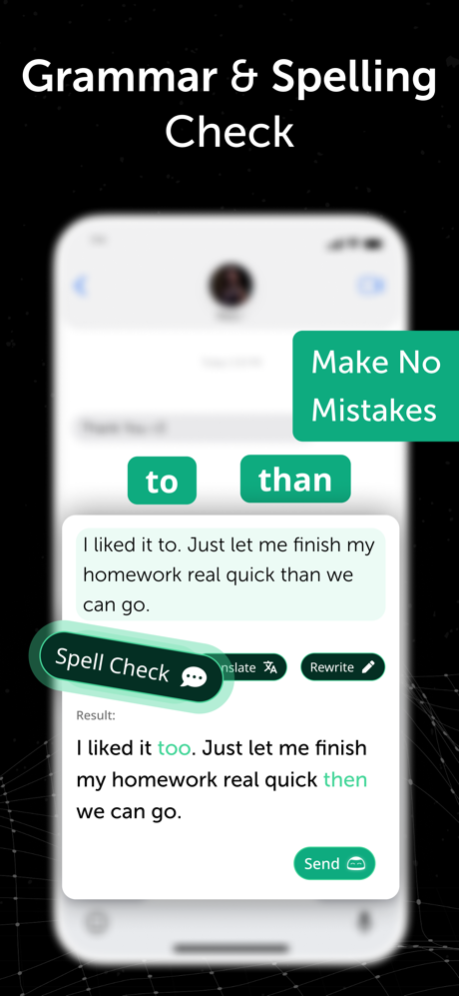
GRAMMAR CHECKER
Max AI Keyboard provides text error checking in all languages including Chinese and Spanish. Bid farewell to humiliating typos and grammatical language errors.
WRITING ASSISTANT
Max AI Keyboard offers superior word alternatives to help you express yourself accurately. You'll no longer need to ponder over finding the perfect words.
TRANSLATOR
Max AI Keyboard can translate your texts instantaneously, eliminating the need for cumbersome copy-pasting. No more dictionary.
AI-POWERED MESSAGE COMPLETE
Max AI Keyboard can extend your messages according to the provided context, accelerating your writing process. Whether you're rushed or simply uninterested in crafting lengthy paragraphs, leave the job to Max AI Keyboard.
PARAPHRASER
Max AI Keyboard is capable of rewording your sentences to ensure uniqueness and plagiarism-free content.
Max AI Keyboard is more than just a writing assistant chatbot; consider it your personal writing coach conveniently located on your phone! With its real-time feedback, your writing skills will enhance, and you'll leave a lasting impression on your readers.
Whether your writing pursuits involve school projects, academic thesis, business documents, creative storytelling, social media posts, or blog entries, or you're simply crafting messages to your crush or drafting professional emails, Max AI Keyboard ensures your communication is always on point.
Max AI Keyboard is an essential app for anyone who does their writing on a mobile device. Download it today and elevate your writing to unprecedented heights!
Follow Us on TikTok!
Instagram: maxaikeyboard
TikTok: maxaikeyboard
Payment & Cancellation:
Subscriptions are billed at the rate selected depending on the subscription plan. Alternatively a one-time payment plan is available to obtain “unlimited access” (this is not a subscription). The subscription fee is charged to your iTunes account at confirmation of purchase.
Subscriptions auto-renew at the cost of the chosen package, unless canceled 24-hours in advance prior to the end of the current period.
Privacy Policy: https://www.feraset.co/privacy.html
Terms of Use: https://www.feraset.co/terms.html
Feb 7, 2024
Version 1.0.4
Hey there! We've fixed some bugs for a smoother experience.
About AI Keyboard MAX:Type Assistant
The company that develops AI Keyboard MAX:Type Assistant is FERASET YAZILIM VE DANISMANLIK ANONIM SIRKETI. The latest version released by its developer is 1.0.4.
To install AI Keyboard MAX:Type Assistant on your iOS device, just click the green Continue To App button above to start the installation process. The app is listed on our website since 2024-02-07 and was downloaded 0 times. We have already checked if the download link is safe, however for your own protection we recommend that you scan the downloaded app with your antivirus. Your antivirus may detect the AI Keyboard MAX:Type Assistant as malware if the download link is broken.
How to install AI Keyboard MAX:Type Assistant on your iOS device:
- Click on the Continue To App button on our website. This will redirect you to the App Store.
- Once the AI Keyboard MAX:Type Assistant is shown in the iTunes listing of your iOS device, you can start its download and installation. Tap on the GET button to the right of the app to start downloading it.
- If you are not logged-in the iOS appstore app, you'll be prompted for your your Apple ID and/or password.
- After AI Keyboard MAX:Type Assistant is downloaded, you'll see an INSTALL button to the right. Tap on it to start the actual installation of the iOS app.
- Once installation is finished you can tap on the OPEN button to start it. Its icon will also be added to your device home screen.
Program Details
General
System requirements
Download information
Pricing
Version History
version 1.0.4
posted on 2024-02-07
Feb 7, 2024
Version 1.0.4
Hey there! We've fixed some bugs for a smoother experience.
version 1.3.0
posted on 2023-08-11
Aug 11, 2023
Version 1.3.0
Hello from Superapp Labs! We've fixed several bugs and implemented some minor improvements.
version 1.2.2
posted on 2023-06-13
Jun 13, 2023
Version 1.2.2
Minor Bug Fixes and UI Updates
Disclaimer
Official App Store Link
We do not host AI Keyboard MAX:Type Assistant on our servers. We did not scan it for viruses, adware, spyware or other type of malware. This app is hosted by Apple and passed their terms and conditions to be listed there. We recommend caution when installing it.
The App Store link for AI Keyboard MAX:Type Assistant is provided to you by apps112.com without any warranties, representations or guarantees of any kind, so access it at your own risk.
If you have questions regarding this particular app contact the publisher directly. For questions about the functionalities of apps112.com contact us.
